This is very simple. I'm just going to post 3 images that will explain how to do this:
It's that easy. Enjoy.
Showing posts with label Tweaks. Show all posts
26 July 2013
05 March 2012
How to Configure PHPStorm to Open Php Files in Your Browser in Localhost
How do you get PHPStorm to show your PHP files in your browser by clicking on the little browser icons in the right part of the window or right clicking and opening in your browser. PHPStorm doesn't just do this automatically. You have to configure it, and the configuration is entirely obvious. Here's what you have to do.
I'm assuming you have XAMPP or its equivalent installed and running on your machine. I'm also assuming you dumped your php files in the htdocs directory of XAMPP and that you can view your files in your browser just by typing the address using localhost/yourfile.php. And now you want to be able to open your files from within PHPStorm.
27 September 2011
Mac OS X's Finder: The Most Important Tweak to Make Search Function
Apple has made some decisions with Finder that some users might find a bit annoying. So, for instance, if you just open Finder and you hit command + F you get this window by default:
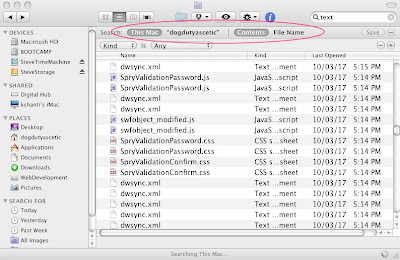
This is a completely useless result. On my Mac the search in fact chokes because so many results are found. This is almost always not what you want in a search result. So, you have to follow these steps to solve the issue and bring some sanity to Finder.
First, you need to change "search the current folder" setting in the Finder advanced preferences.

This is a completely useless result. On my Mac the search in fact chokes because so many results are found. This is almost always not what you want in a search result. So, you have to follow these steps to solve the issue and bring some sanity to Finder.
First, you need to change "search the current folder" setting in the Finder advanced preferences.
Labels:
Apple,
Best Tweaks,
Finder,
Mac,
OSX,
Snow Leopard,
Tips,
Tweaks
Subscribe to:
Posts (Atom)


